From your first coins to a town
Start with the tools to read your surroundings, a little paid work and a clear plan for where you can build. Founding a town comes later—and its treasury needs money of its own.
- Starting grant
- 1,000 units
- Town founding
- 5,000 × index; personal wallet
- Controls
- Right-click the matching item or block
Visual overview
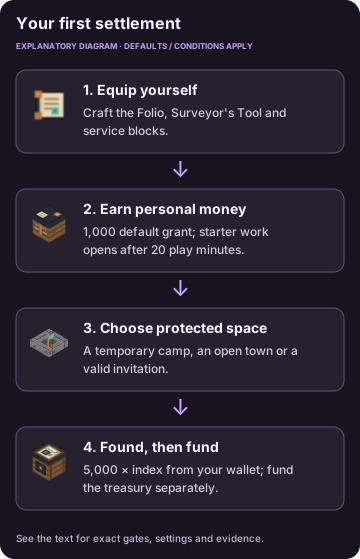
Diagram of reported mechanics. The text retains the full conditions and settings.
Before joining
This guide documents Civic Frontier 0.1.0, Minecraft Java 1.21.1, NeoForge and Java 21. Install the matching mod on the client and server. Server owners can find exact loader requirements in the reference below.
Afterfall is optional. Decide whether to include it before creating the economy: standalone worlds use Civic Credits (CU); worlds created with Afterfall use Supply Tokens. Adding or removing Afterfall later pauses money actions and asks for a new world. No automatic conversion was identified. See build identity and evidence limits.
Craft and open your first tools
Craft a Civic Folio from 3 paper + 1 leather, a Surveyor’s Tool from 2 copper ingots (accepted copper-ingot variants) + 2 sticks + 1 paper, and a Trade Counter from 4 planks (accepted plank variants) + 2 copper ingots in Copper ingots (accepted variants) + 1 iron ingot (accepted iron-ingot variants). These recipes are shapeless; use a crafting table for recipes exceeding the personal grid. The crafting index lists exact tags and the remaining service blocks.
Right-click the held tool or matching block to open it. No custom civic hotkey was identified. A Folio view gives information and navigation; financial and property actions still check the service anchor, role and permissions.
Recognize the first tools
| Civic Folio | Surveyor’s Tool | Trade Counter | Charter Desk |
|---|---|---|---|
 |  |  |  |
Source artwork and static model previews. Exact recipes are in the crafting index.
Earn and inspect your money
First-time players receive a default 1,000-unit grant. At a Trade Counter, inspect the quoted price and sell eligible plain materials. The default public pay ceiling is 100 per hour and 500 per 24 civic uptime hours, scaled by the price index; Starter Work consumes these same limits. Your wallet and physical cash are separate. Check money and market rules before withdrawing notes.
After 20 verified play minutes, Starter Work offers small material deliveries. Complete a unit, check the items consumed and the wallet change, then check how much of the public pay cap remains.
Choose a camp or membership
For temporary protection, a townless player can place a Camp Hearth at a valid site and activate its one-chunk camp. Its shapeless recipe is 3 Cobblestone (accepted variants) + 1 Logs (accepted variants) + 1 Coal or Charcoal. Defaults are 48 civic hours of protection, a 24-hour camp cooldown and up to 8 trusted players. Use the hearth screen to dismantle an active camp.
Alternatively, join an open town or accept a valid invitation. Check its tax method and where you have permission to build. Membership, plot ownership and tenancy are distinct. Joining or founding a town retires your camp. See camps and town roles.
Found and fund a town
- Craft a Charter Desk: 4 Planks (accepted variants) + 2 paper + 1 Copper ingots (accepted variants).
- Choose a valid Overworld site outside other claims/camps, their buffer and the world-spawn exclusion. The founder must be townless and choose a unique valid name.
- Review the founding quote at the desk. The default fee is 5,000 × price index from the founder’s wallet.
- Found the town. You become mayor and the desk’s chunk becomes the civic home plot. The home claim cannot be unclaimed or changed away from civic.
- Deposit money into the town treasury. Founding does not put spending money there. Review the next claim quote and ongoing assessment before expanding.
Success means the town exists, your role is mayor, the civic home chunk appears in Survey, and the treasury has its own funded balance. A failed quote is a reason to check site, wallet, membership and permissions before retrying.
Build a working settlement
Follow claims and plots, then rooms and leases if you want rental housing. Add a Job Board, commercial Trade Counter and linked civic services. A mayor can link a Waypost for travel and respawn.
Town development needs supplies, age, standing, services, housing, public work, reserves and a verified hold. Supplies are consumed on confirmation; the reserve stays in the treasury. Wards are separately funded protection services. Later, nations add shared organization without merging local town ownership.
Find a reference
- Players: jobs, safe trade and deliveries, pigeon post, justice and prison life.
- Leaders and officials: taxes, nation progression and culture, music and festivals.
- Server owners: integrations, controls and permissions, commands and recovery, configuration and world generation/maps.
- Lookups: registered content and all packaged recipes.
All amounts here are mod defaults. This pack’s edited settings and fresh survival results have not been supplied.
Admin & server owner reference
Exact identifiers, original fields and source locators are preserved below. These records describe the documented mod version; they are not commands to run or proof of a new gameplay test.
Original wording and exact fields
The declared Minecraft range is [1.21.1,1.21.2), NeoForge is [21.1.200,) (project build 21.1.252), and javafml loader is [4,).
Original wording and exact fields
in #c:ingots/copper
Original wording and exact fields
in #c:ingots/iron
Original wording and exact fields
in #minecraft:planks
| Civic Folio | Surveyor’s Tool | Trade Counter | Charter Desk |
|---|---|---|---|
| Image: Civic Folio source artwork | Image: Surveyor’s Tool source artwork | Image: Trade Counter source-model preview | Image: Charter Desk source-model preview |
Exact identifiers in context
Craft a Civic Folio from 3 paper + 1 leather, a Surveyor’s Tool from 2 copper ingots (accepted copper-ingot variants) + 2 sticks + 1 paper, and a Trade Counter from 4 planks (accepted plank variants) + 2 copper ingots in #c:ingots/copper + 1 iron ingot (accepted iron-ingot variants). These recipes are shapeless; use a crafting table for recipes exceeding the personal grid. The crafting index lists exact tags and the remaining service blocks.
For temporary protection, a townless player can place a Camp Hearth at a valid site and activate its one-chunk camp. Its shapeless recipe is 3 #c:cobblestones + 1 #minecraft:logs + 1 #minecraft:coals. Defaults are 48 civic hours of protection, a 24-hour camp cooldown and up to 8 trusted players. Use the hearth screen to dismantle an active camp.
- Craft a Charter Desk: 4 #minecraft:planks + 2 paper + 1 #c:ingots/copper.
- Choose a valid Overworld site outside other claims/camps, their buffer and the world-spawn exclusion. The founder must be townless and choose a unique valid name.
- Review the founding quote at the desk. The default fee is 5,000 × price index from the founder’s wallet.
- Found the town. You become mayor and the desk’s chunk becomes the civic home plot. The home claim cannot be unclaimed or changed away from civic.
- Deposit money into the town treasury. Founding does not put spending money there. Review the next claim quote and ongoing assessment before expanding.
Registry IDs
civic_frontier:civic_foliocivic_frontier:surveyors_toolcivic_frontier:charter_deskcivic_frontier:camp_hearthcivic_frontier:trade_counter
Sources & verification
Evidence: pdf-derived. Feature status: implemented-static. Article coverage: ready.
PDF pages 5-6, 9-12, 48 · 03 Getting started · E02, E09-E13, E22-E28
Civic Frontier report, reviewed October 23, 2026. Implementation and historical tests are reported findings unless a direct catalog inspection is separately identified. Pack overrides unknown.
The wiki has not independently playtested report-derived instructions. Your server or modpack settings may change them.