Using civic tools and services
Open the right tool or service and understand the actions your role, ownership and location allow.
Visual overview
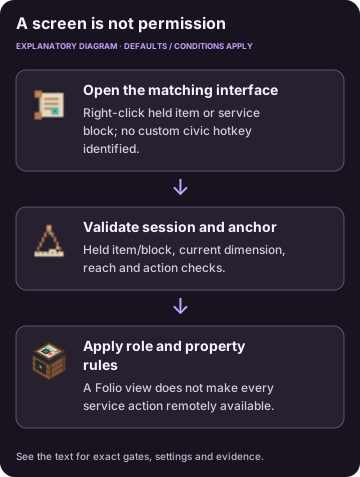
Diagram of reported mechanics. The text retains the full conditions and settings.
Open the matching item or block
Right-click the civic item/block, select its tab/action, review the quote or confirmation, then commit. Server checks govern money and ownership changes. A remote Folio view does not automatically grant physical service access.
| Entry and purpose |
|---|
| Civic Folio overview, civic references and navigation |
| Charter Desk: founding, membership, settings, development |
| Surveyor’s Tool: chunk/plot map, district and room marks |
| Treasury Safe: organization money/banking |
| Trade Counter or supported powered Afterfall computer: buy/sell; physical interface’s cash/starter actions |
| Job Board: listings, work, review/dispute, deliveries |
| Trade Post: two-player invitations/offers/acceptance |
| Camp Hearth: temporary claim management |
| Town Ward: activation, policy and turn-away funds |
| Tax Book: earnings, bills/debt |
| Treaty Table: organization, diplomacy and settings |
| Cage: birds, mail and addressing |
| Letter: recorded text/attachments |
| Homing Charter/Waypost: destinations/quote/warmup |
| Sheriff’s Desk: warrants, prisoners and jurisdiction |
| Prison counter: trade and buy-down |
| Shady Guard: forged transfer |
| Town Speaker: identity/channel/tracks/audio |
| Bandstand: anthem and festival |
| Town project evidence/contributions/history |
| National projects/standing |
| Zone Marker: job work |
| Return Bag: recoverable job contents |
| Admin Book: settings, moderation, economy/recovery/development |
These tools and services open 24 screens. Escape dismisses/backs out of a modal or closes a screen. Enter handles applicable confirmation input; autocomplete uses Up/Down and Enter/Tab. Complete keyboard navigation of every item/mob picker is not established.
Gestures and access checks
There is no separate custom civic hotkey in this build. Use ordinary Minecraft interaction, sneak and inventory controls. Special gestures include offhand Shackles on a lethal hit, sneak-use to stash, empty-hand retrieval and sneaking at an active rescue arrival to return. The opt-in development tracker is fixed at top right.
Keep the matching item in hand or stay near the service block. Default block reach is 5 blocks. If a screen closes or refuses an action, check that the block still exists, that you are in reach and that your role permits the action. A resident, official and administrator can have different actions in the same screen.
Admin & server owner reference
Exact identifiers, original fields and source locators are preserved below. These records describe the documented mod version; they are not commands to run or proof of a new gameplay test.
Permission nodes
All following exact nodes use the civic_frontier namespace. Player nodes default allowed, while civic_frontier.admin defaults to operator level 3:
civic_frontier.town.found, civic_frontier.town.claim, civic_frontier.camp.create, civic_frontier.market.sell, civic_frontier.market.buy, civic_frontier.jobs.post, civic_frontier.jobs.take, civic_frontier.bank.use, civic_frontier.chat.channels, civic_frontier.nation.found.
PermissionAPI declarations do not establish that an external permission plugin is installed. Role, ownership, jurisdiction and location checks apply in addition. Custom commands have their own level-2 branch distinction; see admin commands.
Administrator settings
Admin Book saves world/server values. Scalar metadata says restart=false, but systems may apply changes on their next tick/bill or preserve opening-time rules in an existing project. Six file-only lists and local audio settings are separate from these scalars. Consult the complete configuration reference.
Original wording and exact fields
No custom KeyMapping registration was identified.
Original wording and exact fields
There are 24 registered screen IDs.
| Screen ID | Entry and purpose |
|---|---|
folio | Civic Folio overview, civic references and navigation |
charter | Charter Desk: founding, membership, settings, development |
survey | Surveyor’s Tool: chunk/plot map, district and room marks |
treasury | Treasury Safe: organization money/banking |
market | Trade Counter or supported powered Afterfall computer: buy/sell; physical interface’s cash/starter actions |
jobs | Job Board: listings, work, review/dispute, deliveries |
trade | Trade Post: two-player invitations/offers/acceptance |
camp | Camp Hearth: temporary claim management |
ward | Town Ward: activation, policy and turn-away funds |
taxbook | Tax Book: earnings, bills/debt |
nation | Treaty Table: organization, diplomacy and settings |
dovecote | Cage: birds, mail and addressing |
letter | Letter: recorded text/attachments |
travel | Homing Charter/Waypost: destinations/quote/warmup |
justice | Sheriff’s Desk: warrants, prisoners and jurisdiction |
commissary | Prison counter: trade and buy-down |
bribe | Shady Guard: forged transfer |
culture_music | Town Speaker: identity/channel/tracks/audio |
bandstand | Bandstand: anthem and festival |
development | Town project evidence/contributions/history |
nation_development | National projects/standing |
zone | Zone Marker: job work |
bag | Return Bag: recoverable job contents |
admin | Admin Book: settings, moderation, economy/recovery/development |
Registry IDs
civic_frontier:civic_foliocivic_frontier:surveyors_toolcivic_frontier:tax_bookcivic_frontier:admin_book
Exact settings and original wording
Sessions validate held item or physical anchor, current block, dimension, reach and rate. Default block reach is 5 blocks; modifying actions allow 10/second with burst 20. Invalid anchors close stale screens. The same visible screen can expose different permitted actions for a resident, official or admin.
Sources & verification
Evidence: pdf-derived. Feature status: implemented-static. Article coverage: ready.
PDF pages 34-35 · 22 Screens and administration · E105-E110, E93
Civic Frontier report, reviewed October 23, 2026. Implementation and historical tests are reported findings unless a direct catalog inspection is separately identified. Pack overrides unknown.
The wiki has not independently playtested report-derived instructions. Your server or modpack settings may change them.