Settings and troubleshooting
Use client commands, choose a quality budget, diagnose dark lamps and check renderer, shader and multiplayer limits.
These guides describe the October 23, 2026 source snapshot. Two different downloads share the 1.3.1 label; neither was confirmed to match this snapshot.
Check your light first
Run /dilclient status when portable light is missing. Check whether the effect is enabled, the renderer is active, and the current policy permits your source. A lamp also needs charge and its own on/off switch enabled.
Open Mods → Dynamic Item Lighting → Config for personal rendering options. Start with Balanced as the maximum and leave adaptive quality enabled; adjust after observing your setup. Server policy may restrict sources and replace item rules, but your master toggle, quality maximum, distance and rendering preference remain personal.
These instructions describe the reported source-based 1.3.1 snapshot. They have not been tested in a fresh Minecraft session for this wiki.
Commands you can use
These are local client commands; no operator permission is required. They are not server-console commands.
| Command | Result |
|---|---|
/dilclient status | Reports policy/backend state, lights, queued updates and diagnostic work/network information. |
/dilclient toggle | Switches the whole visual effect on or off and saves the client setting. |
/dilclient quality low | Saves Low as the maximum preset. |
/dilclient quality balanced | Saves Balanced as the maximum preset. |
/dilclient quality high | Saves High as the maximum preset. |
/dilclient export_catalog | Asynchronously exports installed items, effective policy and validation notes as a TSV. |
The export is written under the game directory at dynamicitemlights/exports/catalog-<date>.tsv, with a timestamped filename. The command reports the path or an error. It does not change item definitions or the world. Numeric quality arguments, command aliases and a hidden reset command are not registered.
H toggles a worn headlamp while no screen is open, and is rebindable under Gameplay. Crouch and right-click with an empty main hand is the alternative; release use between presses. F3 + T reloads client resources and local rules, not server data packs.
Pick a quality budget
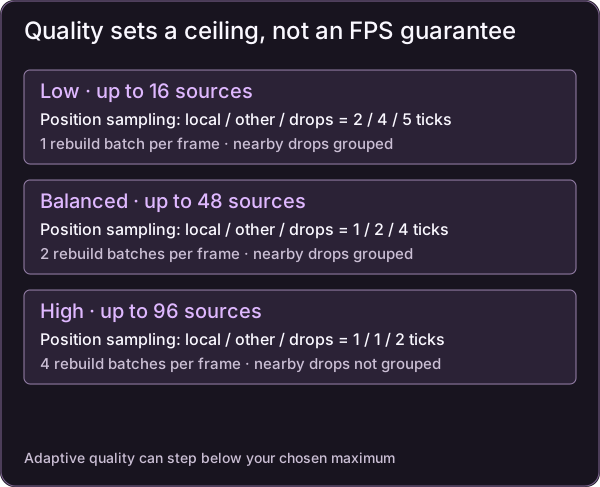
Budget diagram. These limits are not measured FPS guarantees; the table gives the exact sampling intervals.
| Maximum preset | Selected-source cap | Position sampling: local / other living / drops | Rebuild batches per frame | Nearby drops grouped |
|---|---|---|---|---|
| Low | 16 | 2 / 4 / 5 ticks | 1, up to 27 sections | Yes |
| Balanced | 48 | 1 / 2 / 4 ticks | 2, up to 54 sections | Yes |
| High | 96 | 1 / 1 / 2 ticks | 4, up to 108 sections | No |
A maximum is a ceiling. Adaptive quality can temporarily choose a lower preset. The intervals concern rendered position sampling; selected-source eligibility and state are checked every tick. Movement of at least 0.25 blocks, or a brightness/color/state change, refreshes the snapshot. Camera rotation alone does not invalidate terrain.
Sources are favored in this order: local player, other living sources, then dropped items. Distance and brightness affect order within a class. Low and Balanced can keep only the brightest representative of drops within 0.25 blocks in the same grouping cell and water state.
These are work budgets, not measured FPS guarantees. The report’s cloud software-graphics figures are historical observations from limited scenarios, not measurements on your hardware.
Solve common problems
| Symptom | What to check |
|---|---|
| Nothing lights up | Use /dilclient status; check enabled state, backend, source switches, active policy and item eligibility. |
| A charged headlamp is dark | Check its on/off state and the held-sources setting, which also controls headlamps and Luminous. Then check backend and server policy. H does not recharge it. |
| The headlamp has the wrong color | Empty competing hands. A level-14 main-hand torch wins a tie with a level-14 lamp and keeps the torch’s color. |
| A torch stops underwater | Expected for dry-only rules. Check the source origin, not just your feet. A lantern permits submerged use. |
| A sea pickle is dark in air | Expected: its rule requires the origin to be submerged. |
| Recharge does not produce an output | Put the accepted item directly above the helmet in one column, remove extras, and check the fuel table. Redstone dust is invalid. |
| Rule edits do nothing | Reload the correct side and inspect errors. One invalid rule can reject the entire reload and leave the prior set active. A shared server policy replaces local rules. |
| Colored light looks white or absent | Check ambient brightness, source competition, untinted rendering categories and shaders. |
| Mobs still spawn or F3 light is unchanged | Expected. Portable illumination does not change world-light data, spawning, crops or AI. Place real lights for those purposes. |
| Light bleeds through a wall | Expected: there is no occlusion or shadow calculation. |
| Tint lags at dusk or movement leaves a small trail | Terrain needs rebuilding; these are documented rendering limitations. |
| A distant source disappears | Check discovery distance, server tracking and quality caps. Increasing client discovery distance does not extend server tracking. |
Renderer and shader limits
The vanilla rendering path was implemented and tested in the supplied development records. This wiki has not repeated those tests.
Embeddium, Sodium and Rubidium are unverified. AUTO detection disables this mod’s renderer when it detects those terrain renderers. Known competing dynamic-light mod IDs also disable this renderer in AUTO; that does not disable the other mod. FORCE_ENABLE only attempts an override. Neither the AUTO shutdown nor the override certifies compatibility.
Iris/Oculus and shader detection shows a notice while leaving rendering enabled. Shader packs may hide, whiten or duplicate handheld lighting, and remain untested. Tagged modded helmets/glass and custom-renderer alignment also need combination-specific checks.
For multiplayer installation requirements, return to getting started. Two-player lamp visibility, effect expiry and tracking re-entry still require runtime checks; do not interpret a configured server as proof they passed.
Admin & server owner reference
Complete client configuration
File: config/dynamicitemlights-client.toml, grouped under [rendering], [sources] and [diagnostics].
| Key | Default / range | Effect |
|---|---|---|
rendering.enabled | true | Master toggle; disabling schedules removal of rendered light. |
rendering.quality_maximum | BALANCED; LOW, BALANCED, HIGH | Maximum permitted preset. |
rendering.adaptive_quality | true | Automatic reduction and recovery based on scheduling work and pending redraw age. |
rendering.discovery_distance | 48 blocks; 16–96 | Maximum camera-to-emitter-origin discovery distance. |
rendering.backend_mode | AUTO; AUTO, FORCE_ENABLE | Renderer detection policy; forced use is unverified. |
sources.held_sources | true | Living-source path, including headlamps and Luminous; server can restrict it. |
sources.dropped_sources | true | Dropped-item sources, subject to server policy. |
sources.invisibility_exclusion | true | Excludes invisible living entities; shared policy governs in shared mode. |
sources.use_integrated_server_policy | false | Opts the singleplayer/LAN host into the integrated world’s data-pack policy. |
diagnostics.diagnostics | false | Logs a short performance summary every 10 seconds. |
Command changes to enabled and quality are saved. Config reload events request renderer reevaluation on the main thread. Local rule files use the separate F3 + T path.
Scheduling and measurement limits
Discovery rotates through up to 128 other candidates per tick and retains at most 1,024 eligible records. Overflow waits; the local player can evict another eligible record.
Adaptive quality targets 0.5 ms per frame of this mod’s scheduling/submission work. A roughly three-second average above budget, or a visible dirty section older than 500 ms, can lower the preset. Recovery requires 15 seconds below half budget. Changes are at least five seconds apart and never exceed the selected maximum. This accounting excludes full GPU cost, some downstream chunk-building work and rule compilation; general low FPS is not automatically attributed to this mod.
The report records about 0.03–0.19 ms/frame in one cloud baseline, a 0.54 ms loading spike with recovery, and 0.015 ms/frame in a later one-source test. Those are prior scenario-specific records. Production-server, two-player, renderer/shader and real-hardware profiling checks remain outstanding.
Sources & verification
Evidence: pdf-derived. Feature status: implemented-static. Article coverage: ready.
PDF pages 5-6, 8, 10, 12, 14, 18-23 · 03-04, 06, 08, 10, 12, 16-21 · DIL-PDF:S01; DIL-PDF:S02; DIL-PDF:S05; DIL-PDF:S07; DIL-PDF:S08; DIL-PDF:S09; DIL-PDF:S10; DIL-PDF:S11; DIL-PDF:S15
October 23, 2026 source-based 1.3.1 snapshot. Historical checks are attributed; neither same-version JAR is proven equivalent. No new gameplay, build, multiplayer or compatibility verification.
The wiki has not independently playtested report-derived instructions. Your server or modpack settings may change them.